




概述
在使用gitlab-runner进行流水线部署时,提示以下信息
Error response from daemon: client version 1.53 is too new. Maximum supported API version is 1.43
Cleaning up project directory and file based variables 00:00
ERROR: Job failed: exit code 1

解决过程
更新docker-ce版本
这个原因是由于服务器端的docker-ce的版本和gitlab-runner版本不匹配造成的。
[root@WAF gitlab-runner]# docker version
Client: Docker Engine - Community
 Version:           24.0.7
 API version:       1.43
 Go version:        go1.20.10
 Git commit:        afdd53b
 Built:             Thu Oct 26 09:09:13 2023
 OS/Arch:           linux/amd64
 Context:           default

Server: Docker Engine - Community
 Engine:
  Version:          24.0.7
  API version:      1.43 (minimum version 1.12)
  Go version:       go1.20.10
  Git commit:       311b9ff
  Built:            Thu Oct 26 09:07:45 2023
  OS/Arch:          linux/amd64
  Experimental:     false
 containerd:
  Version:          1.6.25
  GitCommit:        d8f198a4ed8892c764191ef7b3b06d8a2eeb5c7f
 runc:
  Version:          1.1.10
  GitCommit:        v1.1.10-0-g18a0cb0
 docker-init:
  Version:          0.19.0
  GitCommit:        de40ad0
通过更新docker-ce的版本可以解决这个问题
[root@WAF gitlab-runner]# dnf update docker-ce docker-ce-cli
上次元数据过期检查:0:10:29 前,执行于 2026年03月04日 星期三 13时02分33秒。
依赖关系解决。
====================================================================================================================================================================
 软件包                                  架构                             版本                                     仓库                                        大小
====================================================================================================================================================================
升级:
 containerd.io                           x86_64                           2.2.1-1.el9                              docker-ce-stable                            35 M
 docker-ce                               x86_64                           3:29.2.1-1.el9                           docker-ce-stable                            24 M
 docker-ce-cli                           x86_64                           1:29.2.1-1.el9                           docker-ce-stable                           8.4 M

事务概要
====================================================================================================================================================================
升级  3 软件包

总计:67 M
总下载:8.4 M
确定吗?[y/N]: y
下载软件包:
[SKIPPED] containerd.io-2.2.1-1.el9.x86_64.rpm: Already downloaded
[SKIPPED] docker-ce-29.2.1-1.el9.x86_64.rpm: Already downloaded
(3/3): docker-ce-cli-29.2.1-1.el9.x86_64.rpm                                                                                        8.9 MB/s | 8.4 MB     00:00
--------------------------------------------------------------------------------------------------------------------------------------------------------------------
总计                                                                                                                                8.9 MB/s | 8.4 MB     00:00
运行事务检查
事务检查成功。
运行事务测试
事务测试成功。
运行事务
  准备中  :                                                                                                                                                     1/1
  升级    : docker-ce-cli-1:29.2.1-1.el9.x86_64                                                                                                                 1/6
  运行脚本: docker-ce-cli-1:29.2.1-1.el9.x86_64                                                                                                                 1/6
  升级    : containerd.io-2.2.1-1.el9.x86_64                                                                                                                    2/6
  运行脚本: containerd.io-2.2.1-1.el9.x86_64                                                                                                                    2/6
  升级    : docker-ce-3:29.2.1-1.el9.x86_64                                                                                                                     3/6
  运行脚本: docker-ce-3:29.2.1-1.el9.x86_64                                                                                                                     3/6
  运行脚本: docker-ce-3:24.0.7-1.el9.x86_64                                                                                                                     4/6
  清理    : docker-ce-3:24.0.7-1.el9.x86_64                                                                                                                     4/6
  运行脚本: docker-ce-3:24.0.7-1.el9.x86_64                                                                                                                     4/6
  运行脚本: containerd.io-1.6.25-3.1.el9.x86_64                                                                                                                 5/6
  清理    : containerd.io-1.6.25-3.1.el9.x86_64                                                                                                                 5/6
  运行脚本: containerd.io-1.6.25-3.1.el9.x86_64                                                                                                                 5/6
  清理    : docker-ce-cli-1:24.0.7-1.el9.x86_64                                                                                                                 6/6
  运行脚本: docker-ce-cli-1:24.0.7-1.el9.x86_64                                                                                                                 6/6
  验证    : containerd.io-2.2.1-1.el9.x86_64                                                                                                                    1/6
  验证    : containerd.io-1.6.25-3.1.el9.x86_64                                                                                                                 2/6
  验证    : docker-ce-3:29.2.1-1.el9.x86_64                                                                                                                     3/6
  验证    : docker-ce-3:24.0.7-1.el9.x86_64                                                                                                                     4/6
  验证    : docker-ce-cli-1:29.2.1-1.el9.x86_64                                                                                                                 5/6
  验证    : docker-ce-cli-1:24.0.7-1.el9.x86_64                                                                                                                 6/6

已升级:
  containerd.io-2.2.1-1.el9.x86_64                     docker-ce-3:29.2.1-1.el9.x86_64                     docker-ce-cli-1:29.2.1-1.el9.x86_64

完毕!
[root@WAF gitlab-runner]# docker version
Client: Docker Engine - Community
 Version:           29.2.1
 API version:       1.53
 Go version:        go1.25.6
 Git commit:        a5c7197
 Built:             Mon Feb  2 17:21:30 2026
 OS/Arch:           linux/amd64
 Context:           default

Server: Docker Engine - Community
 Engine:
  Version:          29.2.1
  API version:      1.53 (minimum version 1.44)
  Go version:       go1.25.6
  Git commit:       6bc6209
  Built:            Mon Feb  2 17:17:39 2026
  OS/Arch:          linux/amd64
  Experimental:     false
 containerd:
  Version:          v2.2.1
  GitCommit:        dea7da592f5d1d2b7755e3a161be07f43fad8f75
 runc:
  Version:          1.3.4
  GitCommit:        v1.3.4-0-gd6d73eb8
 docker-init:
  Version:          0.19.0
  GitCommit:        de40ad0
[root@WAF gitlab-runner]#
重启gitlab-runner
docker restart gitlab-runner
更新config.toml 文件
如以上无法解决,可以根据下列文件进行对比修改
现阶段异常如下:
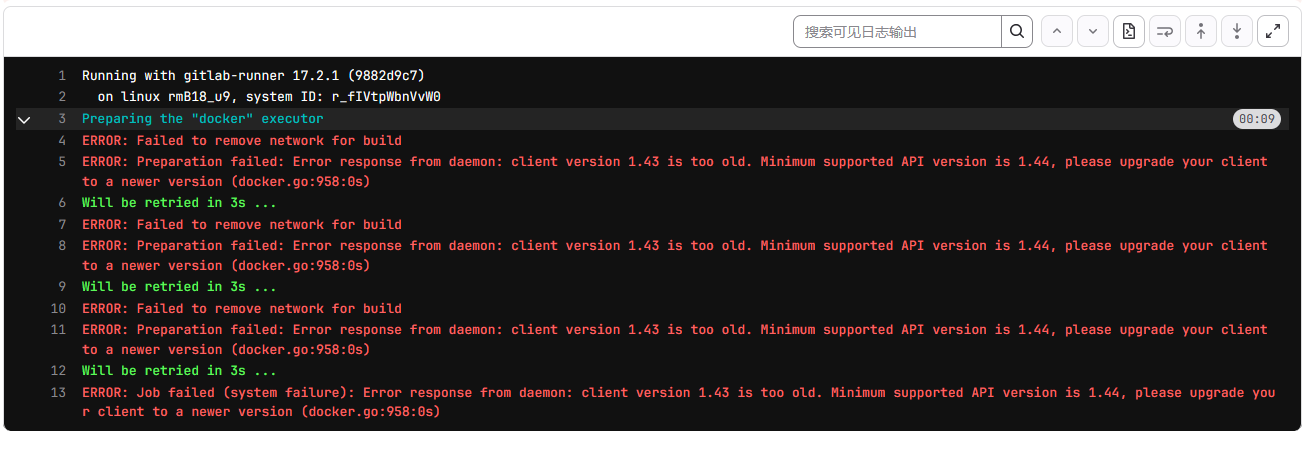
Running with gitlab-runner 17.2.1 (9882d9c7)
  on linux rmB18_u9, system ID: r_fIVtpWbnVvW0
Preparing the "docker" executor 00:09
ERROR: Failed to remove network for build
ERROR: Preparation failed: Error response from daemon: client version 1.43 is too old. Minimum supported API version is 1.44, please upgrade your client to a newer version (docker.go:958:0s)
Will be retried in 3s ...
ERROR: Failed to remove network for build
ERROR: Preparation failed: Error response from daemon: client version 1.43 is too old. Minimum supported API version is 1.44, please upgrade your client to a newer version (docker.go:958:0s)
Will be retried in 3s ...
ERROR: Failed to remove network for build
ERROR: Preparation failed: Error response from daemon: client version 1.43 is too old. Minimum supported API version is 1.44, please upgrade your client to a newer version (docker.go:958:0s)
Will be retried in 3s ...
ERROR: Job failed (system failure): Error response from daemon: client version 1.43 is too old. Minimum supported API version is 1.44, please upgrade your client to a newer version (docker.go:958:0s)
config.toml文件内容如下:
concurrent = 1
check_interval = 0
shutdown_timeout = 0

[session_server]
  session_timeout = 1800

[[runners]]
  name = "linux"
  url = "https://git.wlzs.cn/"
  id = 21
  token = ""
  token_obtained_at = 2024-08-07T11:50:56Z
  token_expires_at = 0001-01-01T00:00:00Z
  executor = "docker"
  [runners.custom_build_dir]
  [runners.cache]
    MaxUploadedArchiveSize = 0
    [runners.cache.s3]
    [runners.cache.gcs]
    [runners.cache.azure]
  [runners.docker]
    tls_verify = false
    image = "docker:latest"
    privileged = true
    disable_entrypoint_overwrite = false
    oom_kill_disable = false
    disable_cache = false
    volumes = ["/var/run/docker.sock:/var/run/docker.sock","/cache","/databases/docker/:/opt/"]
    shm_size = 0
    network_mtu = 0
docker-compose文件
services:
  gitlab-runner:
    image: gitlab/gitlab-runner:latest
    restart: unless-stopped
    hostname: gitlab-runner
    container_name: gitlab-runner
    volumes:
      - ./config:/etc/gitlab-runner
      - /var/run/docker.sock:/var/run/docker.sock
      - /var/run/docker.sock:/runner/services/docker/docker.sock


评论区